kikita & Maps

GIS,spatial and artificial intellegence learning and share

CityEngine 2012.1 与 ArcGIS 10.1 是同期发布的产品,ArcGIS Lisence Manager 10.1 是可以统一管理这两个产品的许可。比起CityEngine 2011的版本,许可方面的确便利了许多。

但是如果想使用 ArcGIS 10.0怎么办呢?

Esri 为了解决这个问题,提供了一个Patch,Esri CityEngine 2012.1 Software Authorization Patch,下载地址:

http://support.esri.com/en/downloads/patches-servicepacks/view/productid/186/metaid/1929

如果您ArcGIS Desktop当前处于中文版界面,打开 ArcGIS Administrator 配置许可的时候,没准会遇到这个问题:“试图执行不支持的程序”。

将ArcGIS Desktop语言切回英文即可解决。

  1. 在安装有ArcGIS Desktop的机器上,安装ArcPad。这里采用了各个产品的最新版本,分别是ArcGIS Desktop 10.1 和 ArcPad 10.0.4。

  1. 激活ArcMap中的对应扩展:

  1. 打开ArcPad 工具条,将当前地图的样式导出。

默认是保存在安装目录下的Style文件夹。将将要生成的aps最好放置到这个位置, \Users\Public\Documents\ArcPad\Styles

为什么么呢?后面会说到~

无论保存在哪,最后会提示保存成功。

Read more »

原文链接:http://forums.arcgis.com/threads/52242-Learning-CityEngine-Tutorials-and-other-Training


Dear all,

We’re getting a lot of inquiries concerning training materials, tutorials and other resources, to learn the CityEngine most efficiently.

Here’s the list of resources I usually recommend :

I highly recommend to browse through all the mentioned resources since they contain all the basic information to get started on a professional level CityEngine project.

1] Resource Center : Videos

http://video.arcgis.com/series/62/cityengine/date/desc

Recommended are all videos which were recorded on version 2012.1, as indicated in each description. [ Some of the videos are older, though we decided to keep them on the web. ]
These give a good overview over how the CityEngine works in it’s basics and what the common workflows are.

I recommend to go through all of them and try to follow the concepts, even though the user interface may have changed slightly between the versions.

Read more »

本文用于解决windows7系统不能使用内部administrator用户注册指纹的问题,已测试通过,绝对原创!


电脑型号:Thinkpad X220
系统:windows7 64位


1、计算机上点右键,选择 管理–本地用户和组–用户,在Administrator用户上点右键,选择重命名,重命名为Administrator1

2、新建一个Administrator账号,密码与Administrator1一样,注销后用Administrator登录,录入指纹,导出指纹配置

3、注销后用Administrator1用户登录,删除Administrator用户,重命名Administrator1为Administrator

4、注销后用Administrator用户登录,导入指纹文件

方法二:

上述方法虽然有一个问题,就是用指纹开机后,在进入系统进还要再刷一次指纹,经过测试,找到了一个可以彻底解决这个问题的方法:

Read more »

1 了解 Terrain Dataset

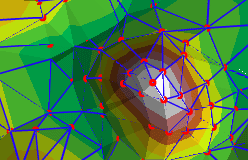
Terrain Dataset 是多分辨率的基于 TIN 的表面数据结构,支持 ArcSDE、个人以及文件地理数据库,存储在ArcGIS  Geodatabase 的 Feature Dataset 中,Feature Dataset 中需要包含构建 TIN 的要素类。

Terrain Dataset 引用原始要素类,对数据重新组织重建索引,动态生成 TIN 表面,并没有实际创建栅格或 TIN 数据。

在数据组织过程中,会创建金字塔,用于决定数据细节层次。 terrain 数据集是多分辨率 TIN。它具有一系列 TIN,其中每一个 TIN 都在特定的地图比例尺范围内使用。

Terrain Dataset 可由不同类型的数据组成。支持的几何类型包括点、多点、线和多边形。每一种几何类型的数据都可以具有不同的表面要素类型(SFType),这与前面一篇博客中构建TIN时选择表面类型作用是相同的。

帮助中的下表很好的将常见数据类型的应用做了总结:


2 Terrain Dataset 的属性

Read more »
0%